воскресенье, 6 октября 2013 г.

Sony VAIO VPCCA, VPC-CA, CA software to install Windows 7, Windows 8.1 & Windows 10 drivers download

Manually Sony VAIO VPCCA, VPC-CA, CA software to install Windows 7, Windows 8.1 & Windows 10. Drivers download link below.


When installing drivers on Sony VAIO important to follow the correct sequence for the installation of these drivers and utility in order to avoid trouble with the function keys: volume+Fn, brightness+Fn, input switching, and others.


VPCCA1C5E, VPCCA1S1E / B, VPCCA1S1E / D, VPCCA1S1E / G, VPCCA1S1E / P, VPCCA1S1E / W, VPCCA1S1R / B, VPCCA1S1R / D, VPCCA1S1R / G, VPCCA1S1R / P, VPCCA1S1R / W, VPCCA2C5E, VPCCA2S0E / D, VPCCA2S0E / G, VPCCA2S0E / L, VPCCA2S0E / P, VPCCA2S0E / R, VPCCA2S0E / W, VPCCA2S1E /, VPCCA2S1E / D, VPCCA2S1E / G, VPCCA2S1E / L, VPCCA2S1E / P, VPCCA2S1E / R, VPCCA2S1E / W, VPCCA2S1R / D , VPCCA2S1R / L, VPCCA2S1R / P, VPCCA2S1R / R, VPCCA2S1R / W, VPCCA2Z0E / G, VPCCA2Z0E / L, VPCCA2Z0E / P, VPCCA2Z0E / R, VPCCA2Z0E / W, VPCCA3C5E, VPCCA3E1E / D, VPCCA3E1E / G, VPCCA3E1E / L , VPCCA3E1E / P, VPCCA3E1E / R, VPCCA3E1E / W, VPCCA3S1E / D, VPCCA3S1E / G, VPCCA3S1E / L, VPCCA3S1E / P, VPCCA3S1E / R, VPCCA3S1E / W, VPCCA3S1R / D, VPCCA3S1R / L, VPCCA3S1R / P, VPCCA3S1R / R, VPCCA3S1R / W, VPCCA3X1R/BI, VPCCA3X1R/PI, VPCCA4C5E, VPCCA4E1E / D, VPCCA4E1E / G, VPCCA4E1E / L, VPCCA4E1E / P, VPCCA4E1E / R, VPCCA4E1E / W, VPCCA4S1E / D, VPCCA4S1E / G, VPCCA4S1E / L, VPCCA4S1E / P, VPCCA4S1E / R, VPCCA4S1E / W, VPCCA4S1R / D, VPCCA4S1R / L, VPCCA4S1R / P, VPCCA4S1R / R, VPCCA4S1R / W, VPCCA4X1R/BI, VPCCA4X1R/PI


Sony VAIO VPCCA Drivers Downloads - Link1 Win 7, Win 8.1 & Win 10
Sony VAIO VPCCA Drivers Downloads - Link2 Win 7, Win 8.1 & Win 10
Warning if the link broken or not working , you can write to me about it and I will try to solve this problem.


The procedure to install drivers for Windows 8.1 & Windows 10 is as follows:
1. 8UPG Chipset Driver Intel - motherboard
2. 8UPG SATA driver Intel
3. 8UPG Graphics Driver for PX Intel
4. 8UPG Graphics Driver AMD 
4.1. 8UPG MRHD Graphics Driver AMD
4.2. 8UPG_VU_Graphics Driver (AMD)
5. Roxio Creator for Win8Upg 12.1b -
6. 8UPG Memory Card Reader Writer Driver MS Ricoh
7. 8UPG Pointing Driver Synaptics
7.1. 8UPG VU Pointing Driver Synaptics
8. 8UPG Wireless Display Driver Intel
9. 8UPG Wireless LAN Driver Atheros
9.1. 8UPG Wireless LAN Driver Intel
10. Battery Check Updater - install & reboot PC
11. VAIO Collaboration Apps - install & reboot PC
12. VAIO Control Center win8upgVer updater - install & reboot PC
12.1. VAIO Control Center Updater - install & reboot PC
13. VAIO Data Restore Tool Win8 Updater
14. VAIO Hardware Diagnostics Win8 Updater
15. VAIO Peripherals Metadata  
16. VAIO Power Management Updater
17. VAIO Update 6.0 for Windows8 Upgrade
18. W8Upg Skype Update


The procedure to install drivers for Windows 7 is as follows:
1. Chipset Driver - motherboard
2. USB 3.0 Driver
3. SATA Driver Non-RAID
4. ME Driver
5. Graphics Driver
5.1. Graphics driver Registry Patch
6. Audio Driver
6.1. Audio Driver HDMI
7. Memory Stick Driver
7.1. SD Card Driver (CPRM)
7.2. SD Card Driver
8. Intel Wireless LAN Driver
9. Intel Wireless Display
10 . Ethernet Driver
11. Atheros Wireless LAN Driver
12. Bluetooth Driver
12.1. Bluetooth Adapter
13. SFEP Driver
13.1. SFEP Driver 32bit-64bit - manually install, more detail here


14. Touchpad Driver
15. VAIO Location Utility - install & reboot PC
16. Sony Shared Library - install & reboot PC
17. Sony Notebook Utilities - install & reboot PC
18. Video Switchable Gfx driver
19. VAIO Smart Network


If you are the unwilling to spend their time - please contact us for help. I complete customization, installation and solve any problems notebooks Sony VAIO.


Grisha Anofriev


Tags : VPCCA1C5E, VPCCA1S1E / B, VPCCA1S1E / D, VPCCA1S1E / G, VPCCA1S1E / P, VPCCA1S1E / W, VPCCA1S1R / B, VPCCA1S1R / D, VPCCA1S1R / G, VPCCA1S1R / P, VPCCA1S1R / W, VPCCA2C5E, VPCCA2S0E / D, VPCCA2S0E / G, VPCCA2S0E / L, VPCCA2S0E / P, VPCCA2S0E / R, VPCCA2S0E / W, VPCCA2S1E /, VPCCA2S1E / D, VPCCA2S1E / G, VPCCA2S1E / L, VPCCA2S1E / P, VPCCA2S1E / R, VPCCA2S1E / W, VPCCA2S1R / D , VPCCA2S1R / L, VPCCA2S1R / P, VPCCA2S1R / R, VPCCA2S1R / W, VPCCA2Z0E / G, VPCCA2Z0E / L, VPCCA2Z0E / P, VPCCA2Z0E / R, VPCCA2Z0E / W, VPCCA3C5E, VPCCA3E1E / D, VPCCA3E1E / G, VPCCA3E1E / L , VPCCA3E1E / P, VPCCA3E1E / R, VPCCA3E1E / W, VPCCA3S1E / D, VPCCA3S1E / G, VPCCA3S1E / L, VPCCA3S1E / P, VPCCA3S1E / R, VPCCA3S1E / W, VPCCA3S1R / D, VPCCA3S1R / L, VPCCA3S1R / P, VPCCA3S1R / R, VPCCA3S1R / W, VPCCA3X1R/BI, VPCCA3X1R/PI, VPCCA4C5E, VPCCA4E1E / D, VPCCA4E1E / G, VPCCA4E1E / L, VPCCA4E1E / P, VPCCA4E1E / R, VPCCA4E1E / W, VPCCA4S1E / D, VPCCA4S1E / G, VPCCA4S1E / L, VPCCA4S1E / P, VPCCA4S1E / R, VPCCA4S1E / W, VPCCA4S1R / D, VPCCA4S1R / L, VPCCA4S1R / P, VPCCA4S1R / R, VPCCA4S1R / W, VPCCA4X1R/BI, VPCCA4X1R/PI

суббота, 5 октября 2013 г.

Sony VAIO PCG-TR, TR Install drivers & downloads Windows XP, VISTA, Windows 7, Windows 8

Sony VAIO PCG-TR, TR Install drivers & downloads Windows XP, VISTA, Windows 7, Windows 8.
When installing drivers on Sony VAIO important to follow the correct sequence for the installation of these drivers in order to avoid trouble with the function keys: volume, brightness , input switching , and others.

Sony VAIO PCG-TR, TR Install drivers & downloads Windows XP, VISTA, Windows 7, Windows 8. When installing drivers on Sony VAIO important to follow the correct sequence for the installation of these drivers in order to avoid trouble with the function keys: volume, brightness , input switching , and others.    Sony VAIO PCG-TR, TR ALL DRIVERS For WINDOWS 7 WINDOWS 8: Link 1: Download Letitbit.net Link 2: Download Turbobit.net  Warning if the link broken or not working , you can write to me about it and I will try to solve this problem.  Support my group on Facebook.com or Twitter join us! Thank you in advance for your support and that you have chosen my blog.  The procedure to install drivers for Windows 8 is as follows: 1. Sony_Shared_Library - install and reboot PC! 2 . Sony_Utils_DLL  - install and reboot PC! 3 . Sony_Video_Shared_Library - install and reboot PC! 4 . VAIO_Event_Service - install and reboot PC! 5 . Setting_Utility_Series - install and reboot PC! 6. VAIO_Control_Center - install and reboot PC! 7. Battery_Checker - install and reboot PC! 8. Wireless_Switch_Setting_Utility 9. VAIO_Update 10 . SonicStage 10.1. SonicStage_Security_Update  If Wasp some reason it does not work or you are the unwilling to spend their time - please contact us for help . Myproizvodim complete customization , installation and solve any problems notebooks Sony VAIO.                              Anofriev Grisha                             E-mail: grisha.anofriev@gmail.com  Tags : PCG-TR1MP, PCG-TR2MP, PCG-TR5MP, PCG-TR5MP / E, PCG-TR5MP / F


Sony VAIO PCG-TR, TR ALL DRIVERS For WINDOWS 7 WINDOWS 8:
Link 2: Download Turbobit.net

Warning if the link broken or not working , you can write to me about it and I will try to solve this problem.

Support my group on Facebook.com or Twitter join us! Thank you in advance for your support and that you have chosen my blog.

The procedure to install drivers for Windows 8 is as follows:
1. Sony_Shared_Library - install and reboot PC!
2 . Sony_Utils_DLL  - install and reboot PC!
3 . Sony_Video_Shared_Library - install and reboot PC!
4 . VAIO_Event_Service - install and reboot PC!
5 . Setting_Utility_Series - install and reboot PC!
6. VAIO_Control_Center - install and reboot PC!
7. Battery_Checker - install and reboot PC!
8. Wireless_Switch_Setting_Utility
9. VAIO_Update
10 . SonicStage
10.1. SonicStage_Security_Update

If Wasp some reason it does not work or you are the unwilling to spend their time - please contact us for help . Myproizvodim complete customization , installation and solve any problems notebooks Sony VAIO.

                            Anofriev Grisha
                            E-mail: grisha.anofriev@gmail.com

Tags : PCG-TR1MP, PCG-TR2MP, PCG-TR5MP, PCG-TR5MP / E, PCG-TR5MP / F

Sony VAIO VPCF2 drivers downloads&installation Windows 7, Windows 8.1 & Windows 10

Manuals Sony VAIO VPCF2 driver downloads&installation Windows 7, Windows 8.1 & Windows 10 64bit.

When installing drivers on Sony VAIO important to follow the correct sequence for the installation of these drivers in order to avoid trouble with the function keys: volume, brightness , input switching , and others.
When installing drivers on Sony VAIO important to follow the correct sequence for the installation of these drivers in order to avoid trouble with the function keys: volume+Fn, brightness+Fn, input switching, and others.


Manuals Sony VAIO VPCF2 driver downloads&installation Windows 7, Windows 8.1 & Windows 10 64bit.  When installing drivers on Sony VAIO important to follow the correct sequence for the installation of these drivers in order to avoid trouble with the function keys: volume, brightness , input switching , and others. When installing drivers on Sony VAIO important to follow the correct sequence for the installation of these drivers in order to avoid trouble with the function keys: volume+Fn, brightness+Fn, input switching, and others.    Sony VAIO VPCF2 drivers downloads Link1 Win7, 8.1 & 10 Sony VAIO VPCF2 drivers downloads Link2 Win7, 8.1 & 10  The procedure to install drivers for Windows 8.1 and Windows 10 is as follows: 1. Intel® Chipset Driver - motherboard 1.1. Intel® SATA Driver - disk driver HDD or SSD  2 . NVIDIA® Graphics Driver  3 . Sony® Firmware Extension Parser Device Driver - see video install, more detail here 3.1. SFEP Driver 32bit-64bit    4 . Realtek® High Definition Audio Driver 4.1. Realtek® Audio Driver Registry Patch 4.2 . Dolby® Audio Driver Update - Update  5 . Broadcom® Bluetooth ® Driver 5.1. Broadcom® Bluetooth ® Driver Update  6.1. Ricoh® SD Memory Card ReaderWriter Driver 6.2. Ricoh® Memory Stick Driver -  MS cards  7. Atheros® Wireless LAN Driver - Wi-Fi  9. Synaptics® Pointing Device Driver 9.1. Synaptics® Pointing Device Driver Update  10. Ricoh® Camera Firmware Update - update for the Webcam, more detail here    12. Sony® Shared Library - utility after installation reboot PC!  13. VAIO® Control Center Software - utility for working keys + Fn, after setting reboot PC !  13.1. VAIO® Control Center Update - utility for working keys + Fn, after setting reboot PC !  14. VAIO® Smart Network Software - utility network management Ethernet (LAN), Wi-Fi (WLAN), 3G (WWAN), Bluetooth  14.2 . VAIO® Easy Connect Software Update  15. VAIO ® Power Management Software - Power Manager, If after installation, the computer will give you an error or charge the battery - then you need this tool to remove, from the Control Panel -> Programs and Features.   The procedure to install drivers for Windows 7 is as follows: 1. Intel ® 6 SeriesC200 Series Chipset Family Driver - chipsent motherboard 1.1 Intel ® Mobile Express Chipset SATA AHCI Controller 1.2. Intel ® Management Engine Interface 1.3. Renesas ® Electronics USB 3.0 Host Controller  2. NVIDIA ® GeForce ® GT 540M 520M Video Driver - Driver RAMDAC 2.1. Sony ® Video Processor Update  3. Sony ® Firmware Extension Parser Device Driver - Manually install, more detail here 3.1. SFEP Driver 32bit-64bit  4. Realtek ® High Definition Audio Driver 4.1. Realtek ® Audio Driver Registry Patch 4.2. Dolby ® Audio Driver Update - Update  5. Broadcom ® Bluetooth ® Driver 5.1. Broadcom ® Bluetooth ® Driver Update  6. Ricoh® PCIe SDXCMMC Host Controller 6.1. Ricoh® SD CPRM Memory Card Reader Writer Driver 6.2 . Ricoh® PCIe Memory Stick ® Host Controller Cards  7. Atheros® AR9287 Wireless Network Adapter - Wi-Fi  8. Realtek® PCIe GBE Family Controller - Ethernet (LAN)  9. Synaptics® PS2 Port TouchPad  10 . Ricoh® Camera Firmware Update - Update WEB camera, more detail here 10.1 ArcSoft WebCam Companion ® 4 Software Software for the camera  11. VAIO® Location Utility - utility, reboot after installation!  12. Sony® Shared Library - utility, reboot after installation!  13. Sony® Notebook Utilities - utility, reboot after installation!  14. VAIO® Smart Network Software - utility network management Ethernet (LAN), Wi-Fi (WLAN), 3G (WWAN), Bluetooth  14.1. VAIO® Smart Network Software Update 14.2 . VAIO® Easy Connect Software Update - install optional   Grisha Anofriev grisha.anofriev@gmail.com   Tags : VPCF213FX, VPCF213FX/BI, VPCF215FX, VPCF215FX/BI, VPCF2190X, VPCF21AFX, VPCF21AFX/BI, VPCF221FX, VPCF221FX / B, VPCF221FX / S, VPCF223FX, VPCF223FX / B, VPCF223FX / S, VPCF224FX, VPCF224FX / B, VPCF224FX/S, VPCF226FM, VPCF226FM / B, VPCF226FM / S, VPCF227FX, VPCF227FX / B, VPCF227FX / S, VPCF2290X, VPCF22AFX, VPCF22AFX/BI, VPCF22BFX, VPCF22BFX / B, VPCF22CFX, VPCF22CFX / B, VPCF22DGX, VPCF22DGX / B, VPCF22EGX, PCF22EGX / B, VPCF22FGX, VPCF22FGX / B, VPCF22IFX, VPCF22IFX / B, VPCF22JFX, VPCF22JFX / B, VPCF22KFX, VPCF22KFX/B, VPCF22SFX, VPCF22SFX / W, VPCF232FX, VPCF232FX / B, VPCF232FX / S, VPCF233FX, VPCF233FX / B, VPCF233FX/S, VPCF234FX, VPCF234FX / B, VPCF234FX / S, VPCF236FM, VPCF236FM / B, VPCF237FX, VPCF237FX / B, VPCF237FX / S, VPCF2390X, VPCF23AFX, VPCF23AFX / B, VPCF23BFX, VPCF23BFX / B, VPCF23CGX, VPCF23CGX / B, VPCF23EFX, VPCF23EFX /B, VPCF23JFX, VPCF23JFX / B, VPCF23JFX/BC, VPCF21Z1E/BI, VPCF21Z1R/BI, VPCF22C5E, VPCF22E1R / B, VPCF22J1E / B, VPCF22L1E / B, VPCF22M0E / B, VPCF22M1E / B, VPCF22M1R / B, VPCF22S1E / B, VPCF22S1R / B, VPCF22S8E / B, VPCF23A9E, VPCF23B9E, VPCF23C5E, VPCF23K1E / B, VPCF23L1E / B VPCF23M1E / B, VPCF23M1R / B, VPCF23N1E / B, VPCF23P1E / B, VPCF23Q1E / B, VPCF23S1E / B, VPCF23S1R / B, VPCF23X1R/BI, VPCF23Z1E/BI, VPCF23Z1R/BI, VPCF24A4E, VPCF24C5E, VPCF24N1E / B, VPCF24L1E / B, VPCF24M1E / B, VPCF24M1R / B, VPCF24P1E / B, VPCF24Q1E / B

Sony VAIO VPCF2 drivers downloads Link1 Win7, 8.1 & 10
Sony VAIO VPCF2 drivers downloads Link2 Win7, 8.1 & 10

The procedure to install drivers for Windows 8.1 and Windows 10 is as follows:
1. Intel® Chipset Driver - motherboard
1.1. Intel® SATA Driver - disk driver HDD or SSD

2 . NVIDIA® Graphics Driver

3 . Sony® Firmware Extension Parser Device Driver - see video install, more detail here
3.1. SFEP Driver 32bit-64bit


4 . Realtek® High Definition Audio Driver
4.1. Realtek® Audio Driver Registry Patch
4.2 . Dolby® Audio Driver Update - Update

5 . Broadcom® Bluetooth ® Driver
5.1. Broadcom® Bluetooth ® Driver Update

6.1. Ricoh® SD Memory Card ReaderWriter Driver
6.2. Ricoh® Memory Stick Driver -  MS cards

7. Atheros® Wireless LAN Driver - Wi-Fi

9. Synaptics® Pointing Device Driver
9.1. Synaptics® Pointing Device Driver Update

10. Ricoh® Camera Firmware Update - update for the Webcam
, more detail here


12. Sony® Shared Library - utility after installation reboot PC!

13. VAIO® Control Center Software - utility for working keys + Fn, after setting 
reboot PC !

13.1. VAIO® Control Center Update - utility for working keys + Fn, after setting 
reboot PC !

14. VAIO® Smart Network Software - utility network management Ethernet (LAN), Wi-Fi (WLAN), 3G (WWAN), Bluetooth

14.2 . VAIO® Easy Connect Software Update

15. VAIO ® Power Management Software - Power Manager, If after installation, the computer will give you an error or charge the battery - then you need this tool to remove, from the Control Panel -> Programs and Features.


The procedure to install drivers for Windows 7 is as follows:
1. Intel ® 6 SeriesC200 Series Chipset Family Driver - chipsent motherboard
1.1 Intel ® Mobile Express Chipset SATA AHCI Controller
1.2. Intel ® Management Engine Interface
1.3. Renesas ® Electronics USB 3.0 Host Controller

2. NVIDIA ® GeForce ® GT 540M 520M Video Driver - Driver RAMDAC
2.1. Sony ® Video Processor Update

3. Sony ® Firmware Extension Parser Device Driver - Manually install, 
more detail here
3.1. SFEP Driver 32bit-64bit

4. Realtek ® High Definition Audio Driver
4.1. Realtek ® Audio Driver Registry Patch
4.2. Dolby ® Audio Driver Update - Update

5. Broadcom ® Bluetooth ® Driver
5.1. Broadcom ® Bluetooth ® Driver Update

6. Ricoh® PCIe SDXCMMC Host Controller
6.1. Ricoh® SD CPRM Memory Card Reader Writer Driver
6.2 . Ricoh® PCIe Memory Stick ® Host Controller Cards

7. Atheros® AR9287 Wireless Network Adapter - Wi-Fi

8. Realtek® PCIe GBE Family Controller - Ethernet (LAN)

9. Synaptics® PS2 Port TouchPad

10 . Ricoh® Camera Firmware Update - Update WEB camera, more detail here
10.1 ArcSoft WebCam Companion ® 4 Software Software for the camera

11. VAIO® Location Utility - utility, reboot after installation!

12. Sony® Shared Library - utility, reboot after installation!

13. Sony® Notebook Utilities - utility, reboot after installation!

14. VAIO® Smart Network Software - utility network management Ethernet (LAN), Wi-Fi (WLAN), 3G (WWAN), Bluetooth

14.1. VAIO® Smart Network Software Update
14.2 . VAIO® Easy Connect Software Update - install optional


Grisha Anofriev


Tags : VPCF213FX, VPCF213FX/BI, VPCF215FX, VPCF215FX/BI, VPCF2190X, VPCF21AFX, VPCF21AFX/BI, VPCF221FX, VPCF221FX / B, VPCF221FX / S, VPCF223FX, VPCF223FX / B, VPCF223FX / S, VPCF224FX, VPCF224FX / B, VPCF224FX/S, VPCF226FM, VPCF226FM / B, VPCF226FM / S, VPCF227FX, VPCF227FX / B, VPCF227FX / S, VPCF2290X, VPCF22AFX, VPCF22AFX/BI, VPCF22BFX, VPCF22BFX / B, VPCF22CFX, VPCF22CFX / B, VPCF22DGX, VPCF22DGX / B, VPCF22EGX, PCF22EGX / B, VPCF22FGX, VPCF22FGX / B, VPCF22IFX, VPCF22IFX / B, VPCF22JFX, VPCF22JFX / B, VPCF22KFX, VPCF22KFX/B, VPCF22SFX, VPCF22SFX / W, VPCF232FX, VPCF232FX / B, VPCF232FX / S, VPCF233FX, VPCF233FX / B, VPCF233FX/S, VPCF234FX, VPCF234FX / B, VPCF234FX / S, VPCF236FM, VPCF236FM / B, VPCF237FX, VPCF237FX / B, VPCF237FX / S, VPCF2390X, VPCF23AFX, VPCF23AFX / B, VPCF23BFX, VPCF23BFX / B, VPCF23CGX, VPCF23CGX / B, VPCF23EFX, VPCF23EFX /B, VPCF23JFX, VPCF23JFX / B, VPCF23JFX/BC, VPCF21Z1E/BI, VPCF21Z1R/BI, VPCF22C5E, VPCF22E1R / B, VPCF22J1E / B, VPCF22L1E / B, VPCF22M0E / B, VPCF22M1E / B, VPCF22M1R / B, VPCF22S1E / B, VPCF22S1R / B, VPCF22S8E / B, VPCF23A9E, VPCF23B9E, VPCF23C5E, VPCF23K1E / B, VPCF23L1E / B VPCF23M1E / B, VPCF23M1R / B, VPCF23N1E / B, VPCF23P1E / B, VPCF23Q1E / B, VPCF23S1E / B, VPCF23S1R / B, VPCF23X1R/BI, VPCF23Z1E/BI, VPCF23Z1R/BI, VPCF24A4E, VPCF24C5E, VPCF24N1E / B, VPCF24L1E / B, VPCF24M1E / B, VPCF24M1R / B, VPCF24P1E / B, VPCF24Q1E / B

Sony VAIO SVS13, VPCS1311, SVSA13, VPCSA Drivers Download drivers Windows 7, Windows 8

Drivers for notebook Sony VAIO SVS13, VPCS1311, SVSA13, VPCSA for the OS Windows 7 and Windows 8. VAIO laptops have always been a complicated install drivers and utilities , and a lot of pre- sofotom - which most people simply do not need.
скачать драйверы бесплатно, торрент, торент

Sony VAIO SVS13 ALL DRIVERS For WINDOWS 7 WINDOWS 8:
Link 2: Download Turbobit.net

Warning if the link broken or not working , you can write to me about it and I will try to solve this problem.

Support my group on Facebook.com or Twitter join us! Thank you in advance for your support and that you have chosen my blog.

Many people who bought the Sony VAIO laptop after the very first to see a bunch of obscure programs, utilities , add-ins , bars, and even some bells and whistles - you want to carry all that stuff ! And to start with a clean slate - to install the new OS Windows, configure your computer to fit your needs .
The field you've taken down Windows, then independently installed Windows 7 or Windows 8 , faced with the problem that half the buttons do not work , the internet is not working , Wi-Fi does not work , Ethernet does not work , etc. Come on sony.com / ru / ua official support site notebooks , and discover what is available for your model 200 ! obscure drivers and utilities, and it is not clear that what is all this mixing - like porridge .
Honestly tell you I thought in time to install drivers for Sony VAIO notebooks will become easier and ponyatneys arrival of new OS Windows 7 and Windows 8 , but the Japanese samurai of Sony simple ways do not go and things got even more complicated and confusing !
I tried to organize it all , describe the sequence of installation , give their recommendations for the successful installation of the drivers and utilities for Sony VAIO SVS13/VPCSA.

I have divided into three categories of all this software from Sony:
1. Drivers - this is something you need our "hardware" ( Eng. Hardware), well, an example of which would be worked Wi-Fi, sound , video, etc. Without them, the laptop will not work correctly .
2 . Utilities - these are the programs offered by our Sony. They are needed in the first place for hot keys : Volume + Fn, brightness + Fn, switching signal output HDMI, plus additional custom keys . There are special tools for managing your wireless networks, Wi-Fi, WWAN, WLAN, 3G, CDMA, EV-DO, LTE/4G. All of these tools we need!
3 . Trash - a program that provides us with a good Sony FREE! The majority of these programs are simply not necessary : VAIO Care, VAIO Gete, VAIO Media, PlayStation Control , etc. goes on - all of these programs you put on your wish and not as they do not affect the performance of the laptop.

So I want to stay on the installation of drivers and utilities .

IMPORTANT : If you have any Windows 8 you will need to first install the drivers for Windows 7 , and then install the drivers on top of Windows 8

The following sequence of installation of Windows 7:
1. Chipset Driver (Intel). Exe
1.1. SATA Driver (Intel) RAID.exe
1.2. SATA Driver (Intel) Registry Patch.exe
1.3. Intel (R) USB 3.0 eXtensible Host Controller.exe
2 . HD Graphics driver 3000 -4000 (Intel). Exe
2.1. Intel_Graphics_Driver.zip
20. WWAN_Connection_Manager_SVS.zip
20.1. WWAN_LTE_CONNECTION_MANAGER.zip
3 . Graphics Driver (NVIDIA). Exe
4 . Audio Driver Registry Patch.exe
4.1. Realtek High Definition Audio Driver.exe
5 . AuthenTec Inc. AES1660.exe
5.1. AuthenTec TrueSuite.exe
5.2 . Authentec_Fingerprint_Driver.zip
5.3. Infineon TPM Professional Package.exe
6. Bluetooth driver (Intel). Exe
7. Wireless Network Adapter (Atheros). Exe
7.1. Intel (R) Wireless Lan Driver.exe
8. Intel (R) WiDi.exe
9. Touchpad Driver.exe - driver tochpada
10 . Intel_WLANDriver.zip - WI-FI
11. ME Driver (Intel). Exe - internal bus driver
12. Realtek PCIE CardReader.exe - driver card reader
13. Realtek PCIe GBE Family Controller.exe - driver network controller
14. Sony_SFEP_Driver.zip - a driver with the name of the ID SNY5001, http://sony-vaio-drivers.blogspot.com/2013/01/id.htmlэто driver should be placed manually as described here
14.1. Sony Firmware Extension Parser Device.exe
15. WWAN_Driver_SVS.zip - put in that case if you have a built-in 3G/4G modem
15.1. WWAN_LTEDriver.zip

NOW GONE UTILITIES
16. Sony Shared Library.exe - overloading the PC after installation
17. VAIO Location Utility.exe - overloading the PC after installation
18. Hotkey Utilities.exe - overloading the PC after installation
19. VAIO Smart Network.exe


The following sequence of installation of Windows 8 :
1. BIOS (SNT) C5 (Kusanagi1) - R0143C5 - put a BIOS update at your own risk. Just install it.
WARNING : During the upgrade, you can not turn off the computer , nothing klatsat , the computer must be connected via the AC adapter !
2 . Graphics Driver (Intel) Driver Integrated graphics - the switch must be in the mode STAMINA. If the switch is in the Speed, then you need to switch it to STAMINA and reboot your computer !
2.1. 8UPG_Graphics Driver for Kusanagi (Intel) - Update!

3 . Graphics Driver NVIDIA - Driver discrete graphics cards - the switch must be in the mode of Speed. If the switch is in STAMINA, then you need to switch it to Speed ​​and reboot your computer !
3.1. Graphics Driver for SNT (NVIDIA) - Update to Video
4 . 8UPG_VU_ME Driver (Intel)
5 . 8. 8UPG_Memory Card Reader Writer Driver (Realtek)
6. 8UPG_VU_Wireless LAN Driver (Intel)
6.1. 8UPG_Wireless Display Driver (Intel)
6.2 . 8UPG_Wireless LAN Driver (Intel)
6.3 . Sony Wireless State Device Driver for 64bit
9. 8UPG_Pointing Driver (Synaptics) Uninstaller
9. Pointing Driver (Synaptics). Exe
10 . 8UPG_VU_Bluetooth Driver (Atheros). Exe
15. VAIO Control Center_Updater
16. VAIO Power Management_Updater
16. VAIO Smart Network Update 3.12
17. W8Upg_Skype [W] _Update 5.10
18. Battery Check_Updater 5.0


If Wasp some reason it does not work or you are the unwilling to spend their time - please contact us for help . Myproizvodim complete customization , installation and solve any problems notebooks Sony VAIO.


                            Anofriev Gregory Dnepropetrovsk
                            E-mail: grisha.anofriev@gmail.com


SVS1311A4E , SVS1311B4E,  SVS1311C5E,  SVS1311D4E, SVS1311E3EW, SVS1311E3R, SVS1311E3RW,  SVS1311E4E, SVS1311F3ES,  SVS1311F3EW, SVS1311G3ES, SVS1311G4E, SVS1311H3EW, SVS1311H4E, SVS1311J3EW, SVS1311K9EB, SVS1311L9ES, SVS1311L9RB, SVS1311L9RS, SVS1311M9ES, SVS1311M9RB, SVS1311N9ES, SVS1311P9EB, SVS1311Q9EB, SVS1311R9EB, SVS1311R9ES, SVS1311S9EB, SVS1311S9RB, SVS1312C5ESVS1312E3RP,SVS1312E3RR, SVS1312E3RW, SVS1312G3ERSVS1312G3EW, SVS1312H3ES, SVS1312J3EW, SVS1312K3EW, SVS1312M9RB,SVS1312N9EB, SVS1312P9EB, SVS1312Q9ES, SVS1312R9EB, SVS1312S9EB, SVS1312S9RB, SVS13A1C5E, SVS13A1S9ES, SVS13A1T9ES, SVS13A1U9ES, SVS13A1V8RB, SVS13A1V8RS, SVS13A1V9EB, SVS13A1W9ES,SVS13A1X8RB, SVS13A1X9ES, SVS13A1Y9ES, SVS13A1Z9ES, SVS13A1Z9RB, SVS13A1Z9RN, SVS13A2C5E, SVS13A2V9RS, SVS13A2W9ES, SVS13A2X9ES, SVS13A2X9RS, SVS13A2Z9ES, SVS13A2Z9RS,SVS13112FXB,SVS13112FXP,SVS13112FXS,SVS13112FXW,SVS13115FXB ,SVS13115FXS,SVS13118FXB, SVS131190X,SVS1311AGXB, SVS1311BFXW, SVS1311CGXB, SVS1311DGXB, SVS1311ZDZB, SVS13122CXB, SVS13122CXP, SVS13122CXR, SVS13122CXS, SVS13122CXW,SVS13125CXB,SVS13127PXB,SVS131290X,SVS1312ACXP,SVS1312ACXW,SVS13A12FXB,SVS13A12FXS,SVS13A18GXB,SVS13A190S,SVS13A190X,SVS13A1CGXB,SVS13A1DGXB,
SVS13A1EGXB,SVS13A25PXB,SVS13A290X,SVS13A2APXB,SVS13A2APXS,VPCSA21GX,
VPCSA21GX/BI,VPCSA21GX/SI,VPCSA22GX,VPCSA22GX/BI,VPCSA22GX/SI,VPCSA23GX,VPCSA23GX/BI,VPCSA23GX/SI,VPCSA24GX,VPCSA24GX/BI,VPCSA24GX/SI,VPCSA25GX,VPCSA25GX/BI,VPCSA25GX/SIVPCSA290X,VPCSA2BGX,VPCSA2BG/BI,VPCSA2CFX,VPCSA2CFX/SI,VPCSA2DGX,VPCSA2DGX/BI,VPCSA2EGX,VPCSA2EGX/BI,VPCSA2FGX,VPCSA2FGX/BI,VPCSA2GGX,VPCSA2GGX/BI,VPCSA2HGX,VPCSA2HGX/BI,VPCSA2SGX,VPCSA2SGX/T,VPCSA31FX,VPCSA31FXBI,VPCSA31FXSI,VPCSA31GX,VPCSA31GXBI,VPCSA31GXSI,VPCSA33GX,VPCSA33GXBI,VPCSA33GXSI,VPCSA35GX,VPCSA35GXBI,VPCSA35GXSI,VPCSA390X,VPCSA3AFX,VPCSA3AFXBI,VPCSA3AFXSI,VPCSA3AGX,VPCSA3AGX/BI,VPCSA3BGX,VPCSA3BGXSI,VPCSA3CGX,VPCSA3CGX/BI,VPCSA3DGX,VPCSA3DGX/BI,VPCSA3EGX,VPCSA3EGX/SI,VPCSA3SGX,VPCSA3SGX/X,VPCSA41FX,VPCSA41FX/BI,VPCSA41FXSI,VPCSA43FX,VPCSA43FX/BI,VPCSA43FXSI,VPCSA45GX,VPCSA45GX/BI,VPCSA490X,VPCSA4AGX,VPCSA4AGX/SI,VPCSA4BGX,VPCSA4BGX/BI,VPCSA4CFX,VPCSA4CFX/SI,VPCSA4DFX,VPCSA4DFX/BI,VPCSA4EGX,VPCSA4EGX/BI,VPCSA4FGX,VPCSA4FGX/BI,VPCSA4GFX,VPCSA4GFX/X,VPCSA4HGX,VPCSA4HGX/BI,VPCSA4JFX,VPCSA4JFX/X,VPCSA4MFY,VPCSA4MFY/BI,VPCSA4SGX,VPCSA4SGX/X,

пятница, 4 октября 2013 г.

Sony VAIO VPCSE or SVSE15, SE Download all drivers software to install on Windows 7, Windows 8

Sony VAIO SE Series SVSE15 new name or the old VPCSE installing drivers on Windows 7 32bit (x86) and 64bit (x64), Windows 8. Perhaps one of the most difficult to install drivers in my practice. When installing an operating tem - then the OS when the system generates an error "operating system not found" means you need to go into the BIOS by pressing F2 during startup and go to the Boot menu and select Legacy UEFI instead save and exit the BIOS
установка драйверов на Windows 7, Windows 8
installing drivers on Windows 7 , Windows 8
To successfully install and guaranteed work Fn buttons and getting the maximum duration of the work required to comply with strict sequence of installing the drivers and utilities are already noticeable .

Sony VAIO VPCSE или SVSE15, SE ALL DRIVERS For WINDOWS 7 WINDOWS 8:
Link 2: Download Turbobit.net

Warning if the link broken or not working , you can write to me about it and I will try to solve this problem.

Support my group on Facebook.com or Twitter join us! Thank you in advance for your support and that you have chosen my blog.

  After successful installation of the OS (Windows 7 or 8) in the device manager you can see a lot of unknown devices (?) And conflict . (!) See Fig. 1 below as I have , but remember that you may be different from my picture because it is possible that you have a different configuration of the PC.
USB\VID_08FF&PID_168F&REV_2501
USB \ VID_08FF & PID_168F & REV_2501

 Fig. 1 Unknown devices and conflicts in Device Manager.

Now, let 's understand that in order to install the drivers and which thus get rid of the conflicts in the system. I'm just warning you that your laptop can be a different picture in the control as The veil is the version of the OS.

1. Standart VGA Graphics Adapter his ID ( how do you know the device ID here ) PCI - \ VEN_8086 & DEV_0166 & SUBSYS_909C104D & REV_09 Put the Intel Graphics Driver HD4000 ( switch mode STAMINA)

2 . Standart VGA Graphics Adapter his ID PCI - \ VEN_10DE & DEV_0FD3 & SUBSYS_909C104D & REV_A1 switched to SPEED and restart the computer, install the driver NVIDIA, reboot . ( for ATI to do everything the same way)
3 . Ethernet controller its ID PCI - \ VEN_10EC & DEV_8168 & SUBSYS_909B104D & REV_07 set manually ! . Look here how to put the drivers manually.

4 . Fingerprint - USB \ VID_08FF & PID_168F & REV_2501 fingerprint reader , simply install AuthenTec Truite and restart your computer

5 . PCI controller Simple Communication PCI - \ VEN_8086 & DEV_1E3A & SUBSYS_909B104D & REV_04 just install Intel Management Engine Interface

6. Pci device PCI \ VEN_10EC & DEV_5209 & SUBSYS_909B104D & REV_01 install Realtek PCIE CR install via Setup.exe file or manually.

7. SM Bus Controller his ID PCI \ VEN_8086 & DEV_1E22 & SUBSYS_909B104D & REV_04 Intel SM Bus Controller 7Series/C216 put in hand

8. Universal Serial Bus USB PCI \ VEN_8086 & DEV_1E31 & SUBSYS_909B104D & REVNe_04 just Stavec

9. Unknown devices ID SNY5001 be set manually

10 . Sets controller PCI \ VEN_8086 & DEV_088E & SUBSYS_40608086 & REV_24 Wireless Networking + Intel ® Centrino ® Wi-Fi Products + Intel ® Centrino ® Advanced-N 6235 + Windows 7 (32 -bit) just set for Wi-FI

11. Chipset - just Stavec

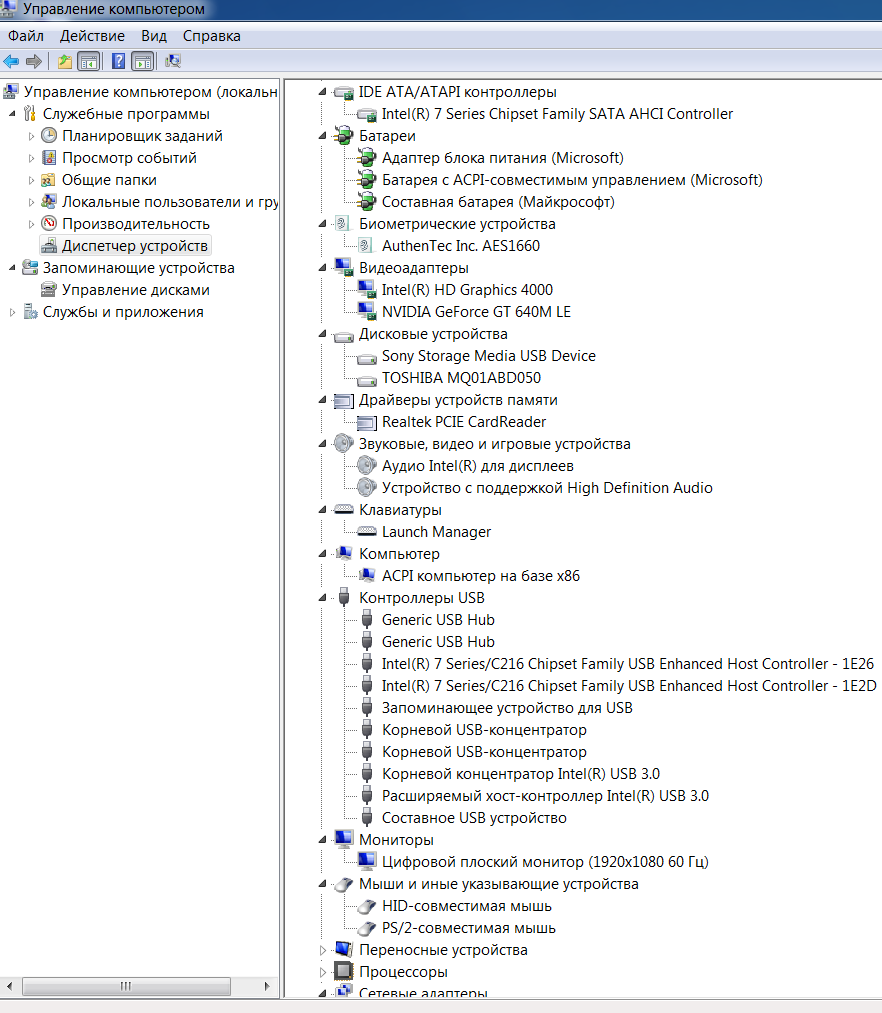
Figure 2 . You can see a screenshot of control after installing the drivers . Should be roughly the same pattern (all the veil on the PC )


SNY5001

SNY5001
Fig. 2 Screenshot of control after installing the drivers .

Now the fly in the ointment . On Windows 7 (32 -bit) could not set a little utility. Therefore the " hot keys + Fn" brightness , switching displays, as well as Bluetooth is not earned.

Now you can proceed to install utilities and drivers for Windows 7 and Windows 8 ( 64 -bit).

12. Realtek Audio Driver just ustnovit

13. Touchpad driver unfortunately works correctly only on 64 -bit - just set

14. Sony Shared Library utility for shortcuts , unfortunately works correctly only on 64 -bit - just install , reboot the PC

15. VAIO Location Utility utility for shortcuts , unfortunately works correctly only on 64 -bit - just install , reboot the PC

16. Sony Notebook Utilities consists of
- Battery Checker 4.6.0.05310
- VAIO Control Center 5.0.0.07070
- VAIO Power Management 5.5.0.07130
Run *. Exe file from the archive will be installed , the computer will reboot several times , you can not stop this process .

17. VAIO Smart Network - power management models due Wi-FI, Bluetooth, and if there is a 3G modem.

If you like this article has helped you can thank the author's purse WebMoney Z276373925574

If Wasp some reason it does not work or you are the unwilling to spend their time - please contact us for help . Myproizvodim complete customization , installation and solve any problems notebooks Sony VAIO.


                            Anofriev Gregory Dnepropetrovsk
                            E-mail: grisha.anofriev@gmail.com


Tags : SVS1311A4E, SVS1311B4E, SVS1311C5E, SVS1311D4E, SVS1311E3EW, SVS1311E3R, SVS1311E3RW, SVS1311E4E, SVS1311F3ES, SVS1311F3EW, SVS1311G3ES, SVS1311G4E, SVS1311H3EW, SVS1311H4E, SVS1311J3EW, SVS1311K9EB, SVS1311L9ES, SVS1311L9RB, SVS1311L9RS, SVS1311M9ES, SVS1311M9RB, SVS1311N9ES, SVS1311P9EB, SVS1311Q9EB,
SVS1311R9EB, SVS1311R9ES, SVS1311S9EB, SVS1311S9RB, SVS1312C5E, SVS1312E3RP, SVS1312E3RR, SVS1312E3RW, SVS1312G3ER, SVS1312G3EW, SVS1312H3ES, SVS1312J3EW, SVS1312K3EW, SVS1312M9RB, SVS1312N9EB, SVS1312P9EB, SVS1312Q9ES, SVS1312R9EB, SVS1312S9EB, SVS1312S9RB, SVS13A1C5E, SVS13A1S9ES, SVS13A1T9ES, SVS13A1U9ES, SVS13A1V8RB, SVS13A1V8RS, SVS13A1V9EB, SVS13A1W9ES, SVS13A1X8RB, SVS13A1X9ES, SVS13A1Y9ES, SVS13A1Z9ES, SVS13A1Z9RB, SVS13A1Z9RN, SVS13A2C5E, SVS13A2V9RS, SVS13A2W9ES, SVS13A2X9ES, SVS13A2X9RS, SVS13A2Z9ES, SVS13A2Z9RS, SVS15112C5E, SVS1511C5E, SVS1511F4R, SVS1511L3ES, SVS1511M3EW, SVS1511N3ES, SVS1511Q9EB, SVS1511R9ES, SVS1511S3RB, SVS1511S9ES, SVS1511T9EB, SVS1511T9ES, SVS1511U9ES, SVS1511V9EB, SVS1511V9ES, SVS1511V9RB, SVS1511W9EB, SVS1511X9EB, SVS1511X9RB, SVS1512S1ES, SVS1512U1RW, SVS1512V1ES, SVS1512V1RB, SVS1512V9ES, SVS1512X1RB, SVS1512X9EB, SVS1512Z1ES, SVS1512Z9EB, SVS1512Z9RB, VPCSE1A9E, VPCSE1B9E, VPCSE1C5E, VPCSE1C9E, VPCSE1D9E, VPCSE1E1E / S, VPCSE1J1E / S, VPCSE1L1E / S, VPCSE1L1E / S, VPCSE1M1E / S, VPCSE1S9E / B, VPCSE1V9E / B, VPCSE1V9R / B, VPCSE1X1R / B, VPCSE1X9E / S, VPCSE1Z9E / B, VPCSE1Z9R / B, VPCSE2C5E, VPCSE2E1E / S, VPCSE2F1E / S, VPCSE2J9E / B, VPCSE2K9E / B, VPCSE2L9E / B, VPCSE2L9E / S, VPCSE2M9E / B, VPCSE2N1E / S, VPCSE2S1E / S, VPCSE2V9E / B, VPCSE2V9E / S, VPCSE2V9R / B, VPCSE2X1R / B, VPCSE2X9E / B, VPCSE2X9E / S, VPCSE2Z9R / B,

Download wallpaper Sony VAIO in high quality.

Download wallpaper Sony VAIO in high quality.

A large assembly of more than 100 kinds of wallpaper on your desktop.

Download wallpaper Sony VAIO in high quality Letitbit.net
VAIO небо, VAIO skyрабочий стол VAIOскачать красивые обои Sonyоригенальныесупер1920х10801280x768 разрешениевысокое качествовысокое разрешениеHi-techлунавысокое качество на рабочий столпрелестьустановить обои

Sony VAIO S, VPCS installation of drivers and utilities for Windows 7, Windows 8

After reinstalling Windows 7, Windows 7 on laptops VAIO series S, VPCS there is a need to install the necessary drivers and utilities for normal operation. Gathering information in different articles and forums , I will try to describe the sequence of installing the drivers and utilities , as well as describe the possible difficulties in the installation. Just posted links to download . As is always the case in laptops VAIO, Sony engineers with software namudrili very strongly , and it turns out that downloading software from the official site , it just does not fit, and if it is established that not all of it. Half of the devices remains unknown , conflicts , etc. The setup process takes a laptop is not much time.
download deivers After reinstalling Windows 7, Windows 7 on laptops VAIO series S, VPCS there is a need to install the necessary drivers and utilities for normal operation. Gathering information in different articles and forums , I will try to describe the sequence of installing the drivers and utilities , as well as describe the possible difficulties in the installation. Just posted links to download . As is always the case in laptops VAIO, Sony engineers with software namudrili very strongly , and it turns out that downloading software from the official site , it just does not fit, and if it is established that not all of it. Half of the devices remains unknown , conflicts , etc. The setup process takes a laptop is not much time. download deivers ALL DRIVERS Sony VAIO S, VPCS CAN DOWNLOAD ONE FILE Link 1: Download Letitbit.net Link 2: Download Turbobit.net  Support my group on Facebook.com or Twitter join us! Thank you in advance for your support and that you have chosen my blog.  Driver installation is as follows:  1. Motherboard Intel_Chipset_Driver_9.1.1.1025 motherboard drivers . 2 . Audio Realtek_Audio_Driver_6.0.1.6098 driver audikarty . 3 . NVIDIA_Graphics_Driver_8.17.11.9791 4 . Card reader Memory Stick / SD Ricoh_SD_Driver_6.13.2.7 PCI \ VEN_1180 & DEV_E822 & SUBSYS_905E104D generally not recognized by the computer in the " Device Manager " is displayed as " unknown device ". Require manual installation of drivers . In my case it was . Ricoh Memory Stick Controller. 5 . Stay install the driver Sony Firmware Extension Parser Device with a cunning name ID SNY5001. This will require manual review all of the devices ( known and unknown ) in the " Device Manager " with the name of the ID equipment. Perhaps it will take a lot of time ! But it's very important to do without these drivers will not work button! How to see the device ID of equipment in the " Device Manager " , right- click the properties in the dialog box , select the tab " Information" in the properties window , select " ID equipment " and see if our driver called SNY5001, then go ahead and install the driver downloaded from the Internet if another name for ID equipment , then do nothing and continue to seek close dalshe6 . Touchpad Synaptics_Touchpad_Driver_15.0.9.0 there usually are not any problems during installation. 7. 3G Modem Gobi2000_WWAN_Driver_1.1.80 naturally placed if it is in your PC. 8. Atheros_Ethernet_Driver_1.0.0.26 9. Broadcom_Bluetooth_Driver easy installation . 10 . Synaptics_Touchpad_Driver  Only after the successful installation of all drivers turn to install these tools in a strict sequence :  1. Install Sony Shared Library and then restart your computer ! 2 . Install Vaio Event Service 3 . Set the Setting Utility Series and restart your computer ! 4 . Install VAIO CONTROL CENTER. 5 . VAIO_Location_Utility and restart your computer ! 6. VAIO Power Management 7. VAIO Smart Network on request  If you like this article has helped you can thank the author's purse WebMoney Z276373925574  If Wasp some reason it does not work or you are the unwilling to spend their time - please contact us for help . Myproizvodim complete customization , installation and solve any problems notebooks Sony VAIO.                                                                            Anofriev Gregory Dnepropetrovsk                                                                           E-mail: grisha.anofriev@gmail.com  Tags : Sony VAIO S, VPCS, VPCS11A7E, VPCS11B7E, VPCS11C5E, VPCS11D7E, VPCS11E7E, VPCS11F7E, VPCS11G7E, VPCS11H7E, VPCS11J7E, VPCS11M1E / W, VPCS11M9R / B, VPCS11V9E / B, VPCS11V9R / B, VPCS11X9E / B, VPCS11X9R / S, VPCS12A7E, VPCS12A7R, VPCS12B7E, VPCS12C5E, VPCS12C7E, VPCS12D7E, VPCS12E7E, VPCS12F7E, VPCS12J1E / W, VPCS12L9E / B, VPCS12M9E / B, VPCS12M9R / S, VPCS12V9E / B, VPCS12V9R / B, VPCS12X9E / B, VPCS12X9R / B, VPCS13A7E, VPCS13B7E, VPCS13C5E, VPCS13I7E, VPCS13L8E / B, VPCS13L9E / B, VPCS13M1E / W, VPCS13S8R / S, VPCS13S9E / B, VPCS13S9R / S, VPCS13V9E / B, VPCS13X8E / B, VPCS13X9E / B, VPCS13X9R / B, VPCS13Z9R / B, VPCS111FM
Sony VAIO S, VPCS ALL DRIVERS For WINDOWS 7 WINDOWS 8:
Link 2: Download Turbobit.net

Warning if the link broken or not working , you can write to me about it and I will try to solve this problem.

Support my group on Facebook.com or Twitter join us! Thank you in advance for your support and that you have chosen my blog.

Driver installation is as follows:

1. Motherboard Intel_Chipset_Driver_9.1.1.1025 motherboard drivers .
2 . Audio Realtek_Audio_Driver_6.0.1.6098 driver audikarty .
3 . NVIDIA_Graphics_Driver_8.17.11.9791
4 . Card reader Memory Stick / SD Ricoh_SD_Driver_6.13.2.7 PCI \ VEN_1180 & DEV_E822 & SUBSYS_905E104D generally not recognized by the computer in the " Device Manager " is displayed as " unknown device ". Require manual installation of drivers . In my case it was . Ricoh Memory Stick Controller.
5 . Stay install the driver Sony Firmware Extension Parser Device with a cunning name ID SNY5001. This will require manual review all of the devices ( known and unknown ) in the " Device Manager " with the name of the ID equipment. Perhaps it will take a lot of time ! But it's very important to do without these drivers will not work button! How to see the device ID of equipment in the " Device Manager " , right- click the properties in the dialog box , select the tab " Information" in the properties window , select " ID equipment " and see if our driver called SNY5001, then go ahead and install the driver downloaded from the Internet if another name for ID equipment , then do nothing and continue to seek close dalshe6 . Touchpad Synaptics_Touchpad_Driver_15.0.9.0 there usually are not any problems during installation.
7. 3G Modem Gobi2000_WWAN_Driver_1.1.80 naturally placed if it is in your PC.
8. Atheros_Ethernet_Driver_1.0.0.26
9. Broadcom_Bluetooth_Driver easy installation .
10 . Synaptics_Touchpad_Driver

Only after the successful installation of all drivers turn to install these tools in a strict sequence :

1. Install Sony Shared Library and then restart your computer !
2 . Install Vaio Event Service
3 . Set the Setting Utility Series and restart your computer !
4 . Install VAIO CONTROL CENTER.
5 . VAIO_Location_Utility and restart your computer !
6. VAIO Power Management
7. VAIO Smart Network on request

If you like this article has helped you can thank the author's purse WebMoney Z276373925574

If Wasp some reason it does not work or you are the unwilling to spend their time - please contact us for help . Myproizvodim complete customization , installation and solve any problems notebooks Sony VAIO.

                                                                          Anofriev Gregory Dnepropetrovsk
                                                                          E-mail: grisha.anofriev@gmail.com

Tags : Sony VAIO S, VPCS, VPCS11A7E, VPCS11B7E, VPCS11C5E, VPCS11D7E, VPCS11E7E, VPCS11F7E, VPCS11G7E, VPCS11H7E, VPCS11J7E, VPCS11M1E / W, VPCS11M9R / B, VPCS11V9E / B, VPCS11V9R / B, VPCS11X9E / B, VPCS11X9R / S, VPCS12A7E, VPCS12A7R, VPCS12B7E, VPCS12C5E, VPCS12C7E, VPCS12D7E, VPCS12E7E, VPCS12F7E, VPCS12J1E / W, VPCS12L9E / B, VPCS12M9E / B, VPCS12M9R / S, VPCS12V9E / B, VPCS12V9R / B, VPCS12X9E / B, VPCS12X9R / B, VPCS13A7E, VPCS13B7E, VPCS13C5E, VPCS13I7E, VPCS13L8E / B, VPCS13L9E / B, VPCS13M1E / W, VPCS13S8R / S, VPCS13S9E / B, VPCS13S9R / S, VPCS13V9E / B, VPCS13X8E / B, VPCS13X9E / B, VPCS13X9R / B, VPCS13Z9R / B, VPCS111FM